Expert advisor · MetaTrader 5

The robot that trades market openings.

Five sessions open around the clock. Arabix watches all of them, decides on its own and manages the trade from entry to exit. You do not read a chart, you do not press a button, you do not wake up at three in the morning.

Fully automatic XAU/USD primary No martingale SL + TP on every order
New York · London · Tokyo · Sydney

Live right now

The sessions it covers

The difference

Most robots watch a chart. This one watches the clock.

Almost every expert advisor on the market reacts to indicators — a crossing, a level, an oscillator. They behave the same at eleven at night as they do at the London open, and the market does not.

Built around the openings

New York, Tokyo, Nikkei, London and Sydney each get their own treatment, their own hours and their own switch. The robot knows which market is waking up and acts only in that window.

It trades when volume arrives

An opening bell brings real participants and real movement. That is the moment the robot is waiting for — not a random signal in a dead hour.

One opportunity per session

It takes its shot and stands down until the next market opens. No overtrading, no revenge entries, no position stacked on top of another.

Fully automatic

Attach it once. Then leave it alone.

This is not a signal service and not an indicator that tells you what to do. It is a closed loop: the robot finds the opportunity, opens the order, protects it, manages it and closes it. Your part ends at installation.

Automated trading robot illustration

It never sleeps through an opening

Tokyo and Sydney open while most of the world is in bed. The robot is awake for every one of them.

Protection travels with the order

Stop loss and take profit are sent in the same request that opens the trade. Nothing sits exposed, ever.

It manages the trade to the end

Once a position is working, the robot keeps adjusting its protection as the move develops — without you touching the terminal.

It adapts to your broker

Server time, order execution mode and minimum stop distance are read from your account and handled silently.

See it working

Straight from the terminal.

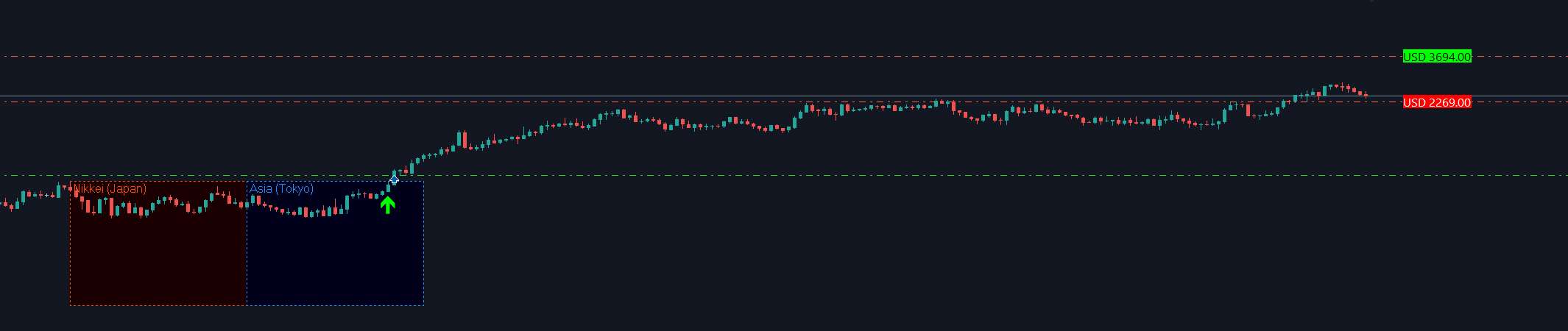
A trade, live on the chart
Arabix opening a session trade on the chart, with the Nikkei and Tokyo session windows marked
Strategy tester — balance and equity
MetaTrader strategy tester balance and equity curve

What it will never do

The three rules that do not have a setting.

Most accounts are not lost to a bad entry. They are lost to a system that doubles down to avoid admitting one.

Rule 01

No Martingale

The lot never grows after a loss. Every order the robot sends uses the same fixed size you set — recovering a losing streak by risking more each time is exactly the behaviour this system refuses.

Rule 02

Does not use price averaging

One position at a time, always. No grid, no layered entries, and never a second order opened just to pull the average price closer to the market.

Rule 03

Take profit and stop loss, always

Both levels reach the broker in the same request that opens the trade. There is no moment where a position sits on the server unprotected — not on entry, not later, not if your terminal disconnects.

Who it is for

One system, three ways of trading it.

Scalping

Short-lived trades measured in minutes, five times around the clock. The robot is looking for opportunity far more often than a strategy that only reads the daily chart.

Trend

When an opening turns into a real move, the position is not cut short. The robot keeps following it and keeps raising the protection behind it as it goes.

Proprietary trading firms

Built to fit the rules a funded account actually checks: fixed lot that never grows after a loss, a stop loss on every single order, one position open at a time, no grid and no averaging.

Getting started

The strategy arrives ready.

No optimisation pass, no parameter hunting, no indicator to install alongside it. The settings file ships with the exact configuration the system was tuned with.

Download illustration
1

Download

One file for the robot, one file with the settings. Nothing else — no DLL, no external indicator, no library to register.

Install illustration
2

Install

Drop both files into the MetaTrader folder, drag the robot onto the chart and load the settings. It configures itself from there.

Let it trade illustration
3

Let it trade

The panel counts down to the next market opening. From that point the robot decides, opens, protects and closes on its own.

Plans

One licence per account number.

Every plan ships the same robot — the difference is how long you keep it and how many accounts you run it on.

Monthly
$59/ MONTH

Try it on a live account without committing to a year.

  • 1 live + 1 demo account
  • All updates while active
  • Ready-made settings file
  • Priority support
Choose monthly
Lifetime
$899ONCE

Pay once. Includes every future version of the robot.

  • 5 live + unlimited demo
  • Updates for life
  • All settings files
  • Priority support
Choose lifetime

Questions

Before you buy.

Do I need to know how to trade?
No. The robot makes every decision itself. What you do need is to understand the risk you are taking: choose a lot size that fits your account, and run it on a demo account first until you are comfortable with how it behaves.
Which symbol should I run it on?
Start on gold — XAU/USD is the primary instrument, the one the shipped settings are calibrated for and the one with the most testing behind it. The logic itself works on anything: attach it to a currency pair, an index or a crypto and it will read that market's sessions the same way. Before you move real money onto a different symbol, run it on demo there first, because the range size and the stop distance scale with each instrument's own volatility.
Do I need to leave my computer on?
The robot has to be connected when a market opens, and some of those openings happen overnight. A VPS or an always-on machine is strongly recommended — otherwise you simply miss the sessions you were asleep for.
Will it work with my broker?
It needs an MT5 account with hedging enabled. Beyond that it adapts: it reads your broker's server time, detects which order execution mode the symbol accepts and respects the minimum stop distance your broker enforces.
How long until I receive the robot?
Immediately. The download link and your settings file are released the moment the payment is confirmed — there is no queue, no manual approval and no waiting for business hours. Markets open five times a day, and the one tonight should not have to wait on us.
How is the licence tied to me?
By trading account number. Moving to a new account number is handled through support and is free within your plan's account allowance.

Put it on a chart and stop watching the clock.

Download, load the settings, and let the robot cover the openings you were never going to be awake for.

See plans
Saqr, the Arabix falcon mascot
Saqr · the Arabix falcon